NotebookLM 2026: AI for students or a practical SEO and content helper?

Dan Urbásek
NotebookLM is one of the most unique AI tools you can find. It has quickly become my favorite tool for certain activities. Where does it excel, where does it fall short, and where should you give it a chance too?
What is NotebookLM and how is it different?
NotebookLM is, like many others, a generative AI tool. At its core, it runs on the current version of Gemini (currently Gemini 3.0 with a close adaptation to 3.5). The big difference, however, is its principle of operation and who it was designed for.
The purpose of NotebookLM is to work with your own selected resources that you upload to your own notebook (chat). It does not look up information on the internet and does not respond based on a learned database of sources - which is the main difference from other generative AI tools like ChatGPT, Gemini, Claude, etc.
This makes it perfect for synthesizing information and learning from your own proven or original sources. And while it will be appreciated especially by students and academics at first, it is definitely not just a school tool. Even SEO consultants and copywriters will find a great partner in it in certain situations.
How does NotebookLM work?
Imagine a classic AI tool as your assistant - for example ChatGPT. When you ask it a question, it will naturally provide an answer. However, that answer is based on information from countless sources of inconsistent quality - and fills in some of the gaps on its own.
NotebookLM, on the other hand, is your personal assistant that knows exactly what you taught it and doesn't work with anything extra. So it can:
- answer your questions perfectly
- transform a lot of your own notes, interview recordings or your own sources
- summarize what's important to you
- and all this without hallucinations and fabrications
If it doesn't know, it will simply tell you it doesn't have sufficient resources to answer.
And if you want to check a particular idea in the answer, just look at the quote it attaches to each idea.
Let's take a closer look at how it works.
Working with NotebookLM
At the outset, it should be said that NotebookLM is available for free. Naturally, there's also a Pro version, which will offer more space for sources, more audio reports, and more options to customize the tool to your liking.
But honestly? For most common scenarios, testing, and serious work, the free version will do just fine.

To work with NotebookLM, you must first create a new workbook by uploading your resources. This will most often be documents, presentations or specific URLs.
But it can also work with YouTube links, audio files (mp3) or.pdf files. In practice, it can often be fastest to insert URLs directly, which it can handle very well.
Limits within NotebookLM
- URLs work well as long as the text on a given website renders even without JavaScript.
- YouTube videos work if they have an available transcript. With newly uploaded videos, you might sometimes run into issues.
- Each resource can have a maximum of 500,000 words. However, you can upload up to 50 sources in the free version, up to 300 in the Pro plan and even up to 600 sources in the Ultra plan.
update May 2026
- The uploaded file must not exceed 200 MB.
- A user without the Pro version can have up to 100 workbooks stored, with a premium of up to 500 for very active users.
- Other features such as mind maps, video creation, reports, deep research or audio summaries have daily limits based on the tariff. All features are available at least in some form (e.g. 3 uses per day) even on the Standard plan for free, with the exception of Cinematic video creation. An overview of the limits and tariffs can be found here, for example.
In my experience, in the vast majority of cases, you don't get anywhere near the maximum. If you don't have the resources, or want to find more, NotebookLM can help you find them directly.
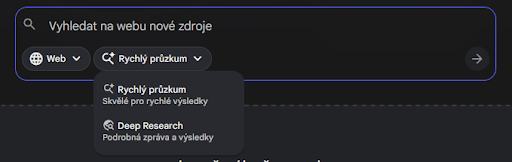
NEW: You can also give the tool access to your own Google Drive and let it search directly from your sources, data and spreadsheets. To get sources from the web, it currently offers two versions of research — Deep Research and Quick Research.
NEW: You will also find the option to automatically label resources. This feature was added by NotebookLM in 2026 and will be especially useful for larger workbooks with more resources. The AI will categorize your resources into groups based on content for easier navigation. The main benefit of this feature is for notebooks that you return to after an extended period of time. This eliminates the need to examine the name of each file, and you’ll know at a glance the areas that resources you’ve worked with in the past fall into.

This workbook is ready to answer your questions - just like you're used to with a regular generative AI tool.
NotebookLM reliably cites sources
As already mentioned, traditional generative models rely on knowledge from tons of sources and every now and then, they can really get stuck - or make something up completely. So any verification of information is very tedious with classical AI tools.
This is where NotebookLM excels. For each section, it lists the sources on which it is based and even shows you the specific passage in the source document.

Overview of other useful features
In addition to its unique abilities that come from working only with your own resources, it also offers some other great features:
- Audio overview - An audio overview in the form of an interview that summarizes the main ideas from the assigned resources. You can edit the audio according to your own instructions. The quality of the discussion is quite high and sounds natural. So if you like to learn from audio sources or listen to podcasts, it's worth checking out.
- Mind map - We’ll take a closer look at this one in more detail later. Your notebook will visually summarise the main common points and give them structure.
- Study Guide - The workbook will create a review quiz based on the given resources and summaries of key concepts to facilitate study.
- Frequently Asked Questions (FaQ) - Useful both for learning and for creating categorical descriptions or FaQ sections for the web. The workbook will generate possible questions on a given topic including an appropriate answer.
- Brief - A brief is ideal especially when working with multiple sources and large amounts of information. It gives you a quick and clear summary.
- Timeline - The workbook creates a timeline that summarizes key points from all sources to give a clear chronological overview.
- Resource labeling - You will also find a new option for automatic resource labeling. This feature was added by NotebookLM in May 2026 and is especially useful for larger workbooks with more resources or workbooks that you return to after a long period of time. This way you don't have to examine every resource, but they are grouped by topic.
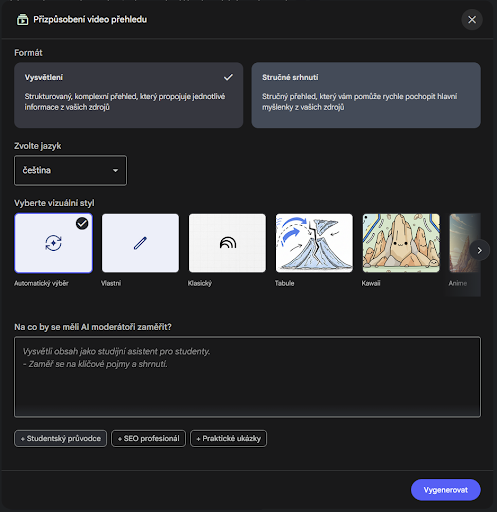
- Video overviews - The latest addition to NotebookLM is video overviews - in short, video presentations with commentary created from your own sources. Video overviews work in English, of course, but also in English, with other languages to follow(https://blog.google/technology/google-labs/notebooklm-video-overviews-studio-upgrades/). Also added in 2026 is a choice of predefined styles and the ability to tailor your video to your own instructions.
When to use NotebookLM and when to use AI models like ChatGPT?
ChatGPT, Gemini, Perplexity or Claude can perform a plethora of tasks quickly and tirelessly. Of course, they excel at:
- brainstorming,
- generating quick ideas,
- creating quick summaries,
- answering simpler questions
- and so on.
In contrast, using NotebookLM is a bit slower - you have to create a new "notebook" for each new topic chat, including uploading resources. But it is this diligence that pays off.
It's perfect when you want to be really sure of the quality of the output or you want to rely only on specific sources (and thus avoid unverified information) - whether for study purposes or for researching and comparing competitors.
If you want to be 100% sure that you are getting relevant information - and not what the internet has just spat out - NotebookLM is a hit. Which finally brings us to practical examples of how to use NotebookLM for SEO and content creation.
NEW: Is it even necessary to choose? Gemini currently allows direct connection to a selected ready workbook in NotebookLM. For example, if you frequently return to the same group of resources for which you created a workbook, but still want to take advantage of Gemini’s strengths. Conversely, when working with Gemini, you can create a workbook that you can then find in NotebookLM. This makes it easy to take advantage of both tools.
Use case 1: Creating a content hub without lengthy content study
If you're interested in content and SEO, you probably already know what content hub.is. The center of a content hub is a single pillar page, but to create it, you need to know the content of the client's website very well. So how about making it a little easier for yourself?
Take advantage of NotebookLM and its ability to work with recorded sources. It will help you not only to graphically represent all the content of the site, but also to create an outline of the content or directly write this page.
How do you do that?
Create a new workbook and upload all blog articles that are relevant to the topic. As an example, I chose the topic of "hot air ballooning" at an experience agency that has written a number of articles about ballooning.

For a graphical overview and better orientation in the topic we will create a mind map. Each section can be further expanded into more specific sections.
Then you can create your own assignment for the outline or the whole article in the chat. It depends on your style of work.

For example, the basis for our content hub could look like this, all after a few minutes of work:
- What is balloon and airship flight and how does it work?
- Locations for flights in the Czech Republic and abroad
- Types of flights and their specifics
- Opportunities and who the flight is for
- Safety and flight preparation
- History and interesting facts from the world of flying
- Price and what is included
In the description of the outline you will find not only sources but also suggestions for links to other selected articles. You can edit this in the chat as you wish.
Use case 2: Comparing and updating content
Planning to update or expand old content? Are you unable to keep your article in the SERP? Maybe your article is missing something and your competitors are offering more information. Instead of tediously browsing and reading through your competitors' articles one by one, let's use NotebookLM - and simplify the process considerably.
NotebookLM and its ability to work only with recorded sources is absolutely perfect in this case for comparing and finding weak spots. He can:
- process competitors' articles
- identify gaps in your existing content, keywords, structure and tone and suggest relevant extensions to your existing content
- help check old data or statistics and suggest up-to-date content (if you provide up-to-date sources and figures)
How do you do that?
Let's take a look at the article "How to wash functional clothes" - and compare our blog article on the site from the bottom ranks in searches with other articles on the same topic that appear in the top positions in the SERPs.
As in the other cases, we will create a new workbook. We'll insert the articles of competitors that pop up in the results before you, as well as your own article (either just written out in a document or a published address).
Write a short prompt to compare and identify information that your article does not show. You can enrich it by identifying tone or important keywords. Then, let the notebook do the work.

This way you get a nice overview without having to read through competitors' articles and compare them with your own (historical) content.
Plus, you can be fairly certain that the design is really based on the sources listed - that is, competitors above you in the search results. These aren't purely guesses and recommendations based on learned data, as is the case with ChatGPT.
Tip: Try the Analyst setting in the chat configuration for a more detailed response or define your own conversation style.
Use case 3: Creating a new language variation and translations
Planning to expand into a new market? NotebookLM will not only create a clear map of your existing content but also assist you with translations. This makes it easier to develop a content plan for your next steps.
NotebookLM translations are based on your sources only. This means that if you upload a Czech version of an address, it only translates your Czech source. For better optimization , you can upload a keyword analysis (KWA) to your sources and have the keywords incorporated into the translations.
NEW: Save the analysis in .csv format (.xlsx is not supported yet) and NotebookLM can process and use the table. In early versions NotebookLM could not handle .csv and had to work around this limitation, for example via .pdf files. Fortunately, this is no longer the case.
Advantages over other AI tools or AI translators
He can follow the structure well, doesn't make up extra content and doesn't make unsolicited edits. Of course, Perplexity or ChatGPT can also translate your text, but even when using CustomGPT, these tools like to edit and improve longer texts in various ways - even if you don't ask them to.
What about DeepL, you ask? It tends to translate texts too literally, so the translated version usually needs a lot of additional tweaking and editing.
You will find citations for each part of the translation - so you can easily check the accuracy of the translation.

In this respect, NotebookLM has proven to be effective and is definitely worth a try.
What are the disadvantages of NotebookLM?
Even NotebookLM is far from a perfect AI tool. The biggest strength can very easily be the biggest weakness.
Workbook creation and time consumption
Creating workbooks for each topic or assignment takes a lot of time, not to mention finding resources. While you can make this easier with a Chrome extension like Myndo, it still takes time and energy and should be taken into account.
NEW: Since the original version of this article, NotebookLM has made significant progress in this regard. It now offers two versions of searching sources directly from the Internet — Fast Research and Deep Research. You are free to combine your own sources and sources that the AI finds for you. But you can also drop NotebookLM onto your own Google Drive and let it search for the spreadsheets and documents you need to work with.
Lack of an option to organize notebooks
If you test and use this tool, over time you’ll accumulate a fairly large number of notebooks. It can then become difficult to navigate among them. The tool is no longer brand new, yet it still lacks essential feature like sorting or creating folders.
Chat history is not saved
Most importantly, remember that while the notebooks you create remain available along with their sources, you must remember to save your selected answers in chat as notes. Your chat history is not saved long-term, so you can't go back to historical discussions as easily as you can with ChatGPT.
NEW: He doesn’t forget anymore! Your conversations are now automatically saved to your history. So you can close a discussion at any time and come back to it later exactly where you left off.
Verdict: Do we recommend NotebookLM?
Despite some drawbacks, NotebookLM is excellent for some tasks and we definitely recommend trying it out. Either for work or for studying, which is what it is actually made for. It's also worth mentioning that most of the major drawbacks have disappeared since the original article was written. So maybe one day we'll see the sorting of notebooks into folders.
What potential uses for your work came to mind while reading the article?
Resources (updated May 2026):
- https://support.google.com/a/answer/16350447?hl=en
- https://blog.google/technology/google-labs/notebooklm-featured-notebooks/
- https://chromewebstore.google.com/detail/myndo/hdifgngfhokdlcacnnpoaabigfcpllai
- https://support.google.com/notebooklm/answer/16269187?hl=en#zippy=%2Climits-for-notebooklm
- https://blog.google/technology/google-labs/notebooklm-video-overviews-studio-upgrades/
- https://support.google.com/notebooklm/answer/16215270?hl=en&co=GENIE
- https://blog.google/innovation-and-ai/products/gemini-app/notebooks-gemini-notebooklm/
- https://support.google.com/notebooklm/answer/16213268?hl=en
Dan Urbásek
Dan’s journey into SEO started with building and managing a website for a small medical clinic. Today, he works on large-scale websites with tens of thousands of visitors. He’s most passionate about projects that make sense – not just driven by numbers, but truly responding to customer needs. For him, SEO is an endless puzzle of figuring out what works, how, and why – from technical setup and user behavior analysis to crafting content that actually makes an impact. And that’s exactly what keeps him hooked on SEO.